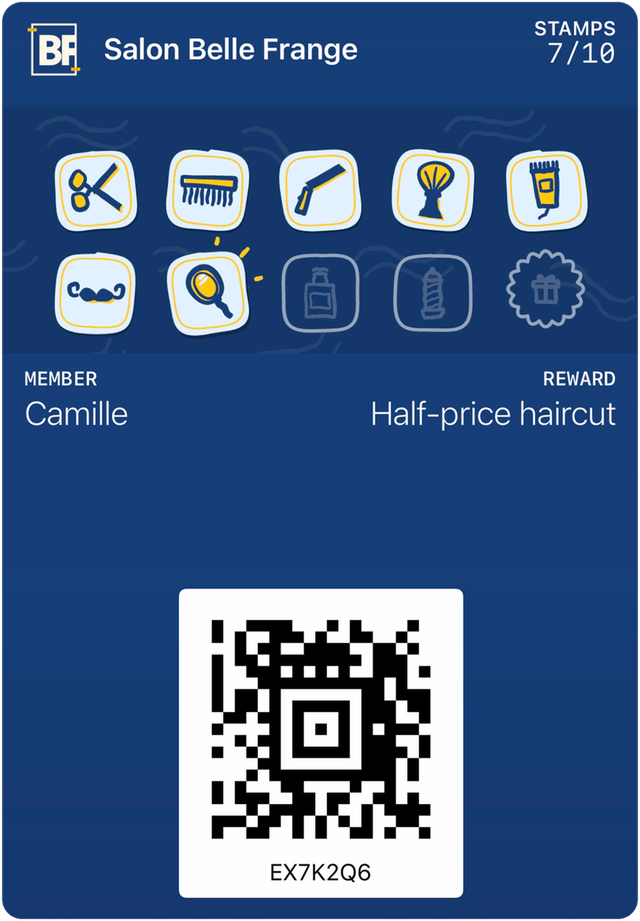
A loyalty card without an app: how it works
Your customers have nothing to download. They scan a code, tap "Add", and the card is in their phone within seconds. Here are the steps, and the limits worth knowing.
By the HoorayPass teamPublished September 30, 20265 min readJump to sources

On this page
Why "without an app"
Asking a customer to download a café’s app for ten stamps is asking a lot: an account, a password, space on their phone. Customers do it less and less. According to Antavo’s 2026 report, from a loyalty software vendor, loyalty app use drops from 59.0% to 44.1% of members, while digital card use rises from 34.7% to 42.4%.
A card without an app relies on what the phone already has: Apple Wallet on iPhone, Google Wallet on Android. Nothing to install, nothing to update.
The steps, on the customer’s side
- They scan the QR code at your counter with their phone’s camera.
- A page opens and recognizes their phone: the "Add to Apple Wallet" button on an iPhone, "Add to Google Wallet" on Android.
- They tap the button: the card goes into their Wallet, under your name, in your colours.
- At the next visit, they open their Wallet and show the card. You scan it, and the stamp appears in their phone.
The same link can also go out by text or email: Apple and Google both provide these channels for their cards.
The phones that cause trouble
A card without an app is not a card without exceptions. The cases to plan for:
- Old Android phones and those without Google services. Google Wallet needs Android 9 or later and Google services. Some phones don’t have them.
- In-app browsers of social networks. In September 2026, developers report that Instagram and Messenger block adding an Apple card: the link has to be opened in Safari.
- Customers who turn down Wallet, out of habit or by choice. That’s their right.
For all these cases, the answer is a backup web card: a personal page, with the same code and the same stamps, that can be added to the home screen. No customer is left out.
What the card can do without an app
- Count stamps and show the reward, updated remotely.
- Notify the customer of a change, within Apple’s and Google’s limits (at most 3 notifications per card per 24 hours at Google).
- Appear on the lock screen near the business, as a suggestion, if the customer allowed it.
When an app still makes sense
An app makes sense when customers use it often for something other than loyalty: ordering ahead, paying, booking. A large chain that already has a well-used app can put its card there.
For a local café, salon or bakery, that’s almost never the case. The customer wants their stamps, not one more app.
For the full definition and what you see on your side, read the starting-point article. What is a digital loyalty card?
In short
- The customer scans a QR code and taps "Add": the card is in their Wallet.
- Plan a backup web card for phones without Wallet and for browsers that block adding the card.
- An app is only worth it if your customers already use it to order or pay.
Sources
- Antavo, Global Customer Loyalty Report 2026 (vendor data)(opens in a new tab)
- Apple, distributing and updating a Wallet pass(opens in a new tab)
- Google, Google Wallet loyalty cards on the web, by email and by message(opens in a new tab)
- Google, Google Wallet release notes (Android 9 or later since June 2024)(opens in a new tab)
- Google, triggering push notifications (limit of 3 per 24 hours)(opens in a new tab)
- Apple Developer Forums, passes blocked in in-app browsers (September 2026)(opens in a new tab)
- WebKit, web push for web apps on iOS and iPadOS (adding to the home screen)(opens in a new tab)