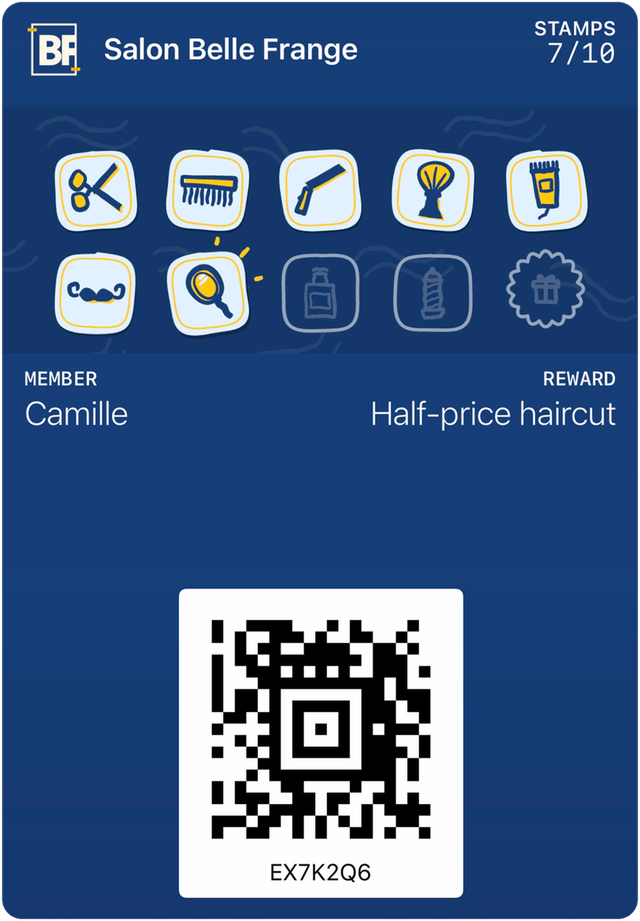
What is a digital loyalty card?
It’s the stamp card from your counter, kept in your customers’ phones next to their bank cards and tickets. It updates itself and needs no app.
By the HoorayPass teamPublished September 30, 20266 min readJump to sources

On this page
The definition in one sentence
A digital loyalty card is a loyalty card saved in Apple Wallet on an iPhone or in Google Wallet on Android, which counts visits or purchases and updates every time the customer comes to your counter.
It replaces the paper card that gets left at home. The idea stays the same: one stamp per visit, a reward at the end. What changes is where the card lives, and everything it can do because it sits in a phone.
What the customer does
The customer installs nothing. They scan a QR code at the counter, or tap a link received by text or email. Apple and Google both provide these distribution channels for their cards: a web page, an email, a message, a QR code.
- They scan the QR code placed near the register.
- They tap "Add": the card goes into their Wallet, under your business’s name.
- They show their card at each visit. You scan it, the stamp is added, and the card updates in their phone.
For phones without Wallet, a backup web card does the same job: a personal page with the same code and the same stamps.
What you see
On your side, every card is a member. You see how many people added the card, who comes back, who is one stamp away from their reward and who has stopped coming. A paper card tells you none of this: it goes into a pocket and you only see it again at the next visit, if the customer hasn’t lost it.
What the card does that paper can’t
- It updates remotely. Apple and Google let the business change the content of a card that has already been added: the stamp count, the reward, a message. The customer has nothing to do.
- It can notify the customer. A change on the card can show a notification. Google Wallet allows at most 3 per card per 24 hours; Apple asks that they be kept for what matters to the customer.
- It can show up in the right place. An Apple card can appear on the lock screen near the business, within about 100 metres, as a simple suggestion. In October 2025, Google relaunched a similar reminder for customers who allow location access.
- It doesn’t get left at home. It’s in the phone, which the customer almost always carries.
What it doesn’t do
A digital card is not an app. It can’t send as many messages as you like: Apple’s and Google’s limits protect your customers, and that’s a good thing. It doesn’t replace your register either: it counts visits, the register counts money.
And it only works if you offer it. A card nobody mentions at the counter stays empty, on paper or in a phone.
Why customers accept it
Customers are tired of store apps. According to the 2026 report from Antavo, a loyalty software vendor, loyalty app use drops from 59.0% to 44.1% of members, while digital cards rise from 34.7% to 42.4%. A card added in two taps asks for less trust than an app to download.
For the steps and the limits in detail, read the article on loyalty cards without an app. Loyalty card without an app
In short
- A digital loyalty card is your stamp card, in Apple Wallet or Google Wallet.
- The customer scans a QR code and taps "Add": no app to install.
- You see your members, their visits and who has stopped coming.
- The card updates itself and can notify the customer, within the limits set by Apple and Google.
Sources
- Apple, distributing and updating a Wallet pass (developer documentation)(opens in a new tab)
- Apple, adding a web service to update passes(opens in a new tab)
- Apple, showing a pass on the lock screen(opens in a new tab)
- Google, Google Wallet loyalty cards on the web, by email and by message(opens in a new tab)
- Google, triggering push notifications (limit of 3 per 24 hours)(opens in a new tab)
- Google, Google Wallet release notes (proximity reminders, October 2025)(opens in a new tab)
- Antavo, Global Customer Loyalty Report 2026 (vendor data)(opens in a new tab)